
Exporter les (des) commandes
[vc_row][vc_column][vc_column_text]
[su_post field= »post_modified » before= »Dernière mise à jour : » post_type= »page »]
[/vc_column_text][/vc_column][/vc_row][vc_row][vc_column][vc_column_text]
[/vc_column_text][/vc_column][/vc_row][vc_row css= ».vc_custom_1674830376894{margin-bottom: 50px !important;padding-top: 0px !important;padding-right: 0px !important;padding-bottom: 0px !important;padding-left: 0px !important;} »][vc_column][vc_column_text]
Préambule
[/vc_column_text][vc_column_text]L’export de commandes peut servir à de nombreuses fins :
- Etablir des statistiques ;
- Faire un point des recettes sur une action ;
- réaliser des rapprochements comptables,
- etc…
[/vc_column_text][/vc_column][/vc_row][vc_row css= ».vc_custom_1674830643152{margin-bottom: 40px !important;border-top-width: 1px !important;border-right-width: 1px !important;border-bottom-width: 1px !important;border-left-width: 1px !important;padding-top: 20px !important;padding-right: 20px !important;padding-bottom: 0px !important;padding-left: 20px !important;border-left-color: #ce1f55 !important;border-left-style: solid !important;border-right-color: #ce1f55 !important;border-right-style: solid !important;border-top-color: #ce1f55 !important;border-top-style: solid !important;border-bottom-color: #ce1f55 !important;border-bottom-style: solid !important;border-radius: 5px !important;} »][vc_column css= ».vc_custom_1674830404472{margin: 0px !important;padding: 0px !important;border: 0px initial !important;} »][vc_column_text css= ».vc_custom_1675063797783{margin-top: 0px !important;margin-right: 0px !important;margin-bottom: 0px !important;margin-left: 0px !important;padding-top: 0px !important;padding-right: 0px !important;padding-bottom: 0px !important;padding-left: 0px !important;} »]
1/ Accéder à l’espace d’exportation
[/vc_column_text][vc_column_text]
- Depuis le site
- Menu de pied de page
- Les commandes
- Dans le menu de la barre latérale gauche
- En sous-menu de Woocommerce
- Exporter commandes
- Depuis l’administration
- Menu latéral de gauche
- Woocommerce
- Exporter commandes
[/vc_column_text][/vc_column][/vc_row][vc_row css= ».vc_custom_1674830643152{margin-bottom: 40px !important;border-top-width: 1px !important;border-right-width: 1px !important;border-bottom-width: 1px !important;border-left-width: 1px !important;padding-top: 20px !important;padding-right: 20px !important;padding-bottom: 0px !important;padding-left: 20px !important;border-left-color: #ce1f55 !important;border-left-style: solid !important;border-right-color: #ce1f55 !important;border-right-style: solid !important;border-top-color: #ce1f55 !important;border-top-style: solid !important;border-bottom-color: #ce1f55 !important;border-bottom-style: solid !important;border-radius: 5px !important;} »][vc_column css= ».vc_custom_1674830404472{margin: 0px !important;padding: 0px !important;border: 0px initial !important;} »][vc_column_text css= ».vc_custom_1675071424823{margin-top: 0px !important;margin-right: 0px !important;margin-bottom: 0px !important;margin-left: 0px !important;padding-top: 0px !important;padding-right: 0px !important;padding-bottom: 0px !important;padding-left: 0px !important;} »]
2/ Détail de l’écran d’exportation
[/vc_column_text][vc_column_text css= ».vc_custom_1675070893159{margin-top: 0px !important;margin-right: 0px !important;margin-bottom: 0px !important;margin-left: 0px !important;padding-top: 0px !important;padding-right: 0px !important;padding-bottom: 0px !important;padding-left: 0px !important;} »]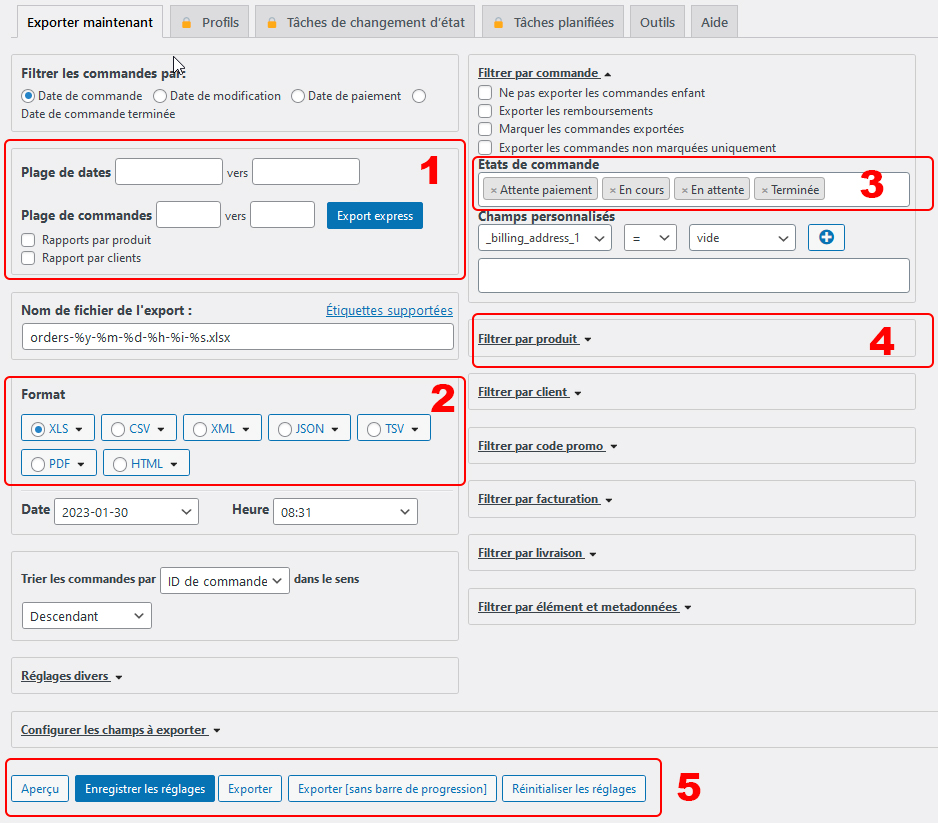 [/vc_column_text][/vc_column][/vc_row][vc_row css= ».vc_custom_1674894992644{margin-bottom: 20px !important;border-top-width: 1px !important;border-right-width: 1px !important;border-bottom-width: 1px !important;border-left-width: 1px !important;padding-top: 0px !important;padding-right: 0px !important;padding-bottom: 0px !important;padding-left: 0px !important;border-left-color: #ce1f55 !important;border-left-style: solid !important;border-right-color: #ce1f55 !important;border-right-style: solid !important;border-top-color: #ce1f55 !important;border-top-style: solid !important;border-bottom-color: #ce1f55 !important;border-bottom-style: solid !important;border-radius: 5px !important;} »][vc_column width= »1/6″][vc_column_text]
1
[/vc_column_text][/vc_column][vc_column width= »5/6″][vc_column_text]
Plage de dates
[/vc_column_text][vc_column_text]
- Permet de définir un date de début et une date de fin de l’exportation
[/vc_column_text][/vc_column][/vc_row][vc_row css= ».vc_custom_1674895007012{margin-bottom: 20px !important;border-top-width: 1px !important;border-right-width: 1px !important;border-bottom-width: 1px !important;border-left-width: 1px !important;padding-top: 0px !important;padding-right: 0px !important;padding-bottom: 0px !important;padding-left: 0px !important;border-left-color: #ce1f55 !important;border-left-style: solid !important;border-right-color: #ce1f55 !important;border-right-style: solid !important;border-top-color: #ce1f55 !important;border-top-style: solid !important;border-bottom-color: #ce1f55 !important;border-bottom-style: solid !important;border-radius: 5px !important;} »][vc_column width= »1/6″][vc_column_text]
2
[/vc_column_text][/vc_column][vc_column width= »5/6″][vc_column_text]
Format
[/vc_column_text][vc_column_text]
- Permet de définir le format d’exportation
(XLS recommandé)
[/vc_column_text][/vc_column][/vc_row][vc_row css= ».vc_custom_1674895039275{margin-bottom: 20px !important;border-top-width: 1px !important;border-right-width: 1px !important;border-bottom-width: 1px !important;border-left-width: 1px !important;border-left-color: #ce1f55 !important;border-left-style: solid !important;border-right-color: #ce1f55 !important;border-right-style: solid !important;border-top-color: #ce1f55 !important;border-top-style: solid !important;border-bottom-color: #ce1f55 !important;border-bottom-style: solid !important;border-radius: 5px !important;} »][vc_column width= »1/6″][vc_column_text]
3
[/vc_column_text][/vc_column][vc_column width= »5/6″][vc_column_text]
Etats de la commande
[/vc_column_text][vc_column_text]
- Permet de sélectionner les commandes à extraire en fonction de leurs état
- NB : nous recommandons de d’abord faire un point sur les commandes (cf notice Consulter, modifier et agir sur les commandes)
[/vc_column_text][/vc_column][/vc_row][vc_row css= ».vc_custom_1674895052079{margin-bottom: 20px !important;border-top-width: 1px !important;border-right-width: 1px !important;border-bottom-width: 1px !important;border-left-width: 1px !important;padding-top: 0px !important;padding-right: 0px !important;padding-bottom: 0px !important;padding-left: 0px !important;border-left-color: #ce1f55 !important;border-left-style: solid !important;border-right-color: #ce1f55 !important;border-right-style: solid !important;border-top-color: #ce1f55 !important;border-top-style: solid !important;border-bottom-color: #ce1f55 !important;border-bottom-style: solid !important;border-radius: 5px !important;} »][vc_column width= »1/6″][vc_column_text]
4
[/vc_column_text][/vc_column][vc_column width= »5/6″][vc_column_text]
Filtrer par produit
[/vc_column_text][vc_column_text]Chaque événement correspond à un produit et chaque produit appartient à une catégorie.
Par exemple : l’afterwork qui s’est déroulé le 15 novemnre 2022 à Pub La Canaulaise…
- a son propre produit : Afterwork 2022#5 – Pub La Canaulaise
- et appartient à la catégorie : Afterworks
On peut ainsi avoir un rapport des recettes pour un événement ou pour une catégorie d’événements.[/vc_column_text][vc_row_inner gap= »25″][vc_column_inner width= »1/2″][vc_column_text]
Exportation des ventes d’une catégorie de produit
[/vc_column_text][vc_single_image image= »4517″ img_size= »full »][/vc_column_inner][vc_column_inner width= »1/2″][vc_column_text]
Exportation des ventes d’un produit
[/vc_column_text][vc_single_image image= »4519″ img_size= »full » css= ».vc_custom_1675344604080{margin: 0px !important;padding: 0px !important;border: 0px initial !important;} »][vc_column_text]
Saisissez 3 lettres clés (ou plus)
[/vc_column_text][/vc_column_inner][/vc_row_inner][/vc_column][/vc_row][vc_row css= ».vc_custom_1674895126022{margin-bottom: 20px !important;border-top-width: 1px !important;border-right-width: 1px !important;border-bottom-width: 1px !important;border-left-width: 1px !important;padding-top: 0px !important;padding-right: 0px !important;padding-bottom: 0px !important;padding-left: 0px !important;border-left-color: #ce1f55 !important;border-left-style: solid !important;border-right-color: #ce1f55 !important;border-right-style: solid !important;border-top-color: #ce1f55 !important;border-top-style: solid !important;border-bottom-color: #ce1f55 !important;border-bottom-style: solid !important;border-radius: 5px !important;} »][vc_column width= »1/6″][vc_column_text]
5
[/vc_column_text][/vc_column][vc_column width= »5/6″][vc_column_text]
Exportation
[/vc_column_text][vc_column_text]Exporter : permet de lancer l’exportation.
Enregistrer les réglages : permet d’enregistrer les réglages de votre exportation (pour gagner du temps la prochaine fois).
Réinitialiser les réglages : remet tous les paramètres à zéro.
[/vc_column_text][/vc_column][/vc_row]