
Consulter & exporter les participants à un événement
[vc_row][vc_column][vc_column_text]
[su_post field= »post_modified » before= »Dernière mise à jour : » post_type= »page »]
[/vc_column_text][/vc_column][/vc_row][vc_row][vc_column][vc_column_text]
[/vc_column_text][/vc_column][/vc_row][vc_row css= ».vc_custom_1674830376894{margin-bottom: 50px !important;padding-top: 0px !important;padding-right: 0px !important;padding-bottom: 0px !important;padding-left: 0px !important;} »][vc_column][vc_column_text]
Préambule
[/vc_column_text][vc_column_text]Tous les événements du club sont gérés de la même façon :
- Les plénières ;
- Les petits déjeuners ;
- Les afterworks ;
- La journée du club ;
- Le SéSAM…
La notice suivante explique comment consulter et exporter la liste des inscrits.
Vous pouvez ainsi exploiter ces données pour créer des listes de pointage ou d’émargement et créer des statistiques à l’aide d’un logiciel de type « tableur ».
Un article complémentaire sur le traitement des fichiers au format CSV est disponible ici.[/vc_column_text][/vc_column][/vc_row][vc_row css= ».vc_custom_1674894992644{margin-bottom: 20px !important;border-top-width: 1px !important;border-right-width: 1px !important;border-bottom-width: 1px !important;border-left-width: 1px !important;padding-top: 0px !important;padding-right: 0px !important;padding-bottom: 0px !important;padding-left: 0px !important;border-left-color: #ce1f55 !important;border-left-style: solid !important;border-right-color: #ce1f55 !important;border-right-style: solid !important;border-top-color: #ce1f55 !important;border-top-style: solid !important;border-bottom-color: #ce1f55 !important;border-bottom-style: solid !important;border-radius: 5px !important;} »][vc_column width= »1/6″][vc_column_text]
1
[/vc_column_text][/vc_column][vc_column width= »5/6″][vc_column_text]
Accéder à l’espace des Evénements
[/vc_column_text][vc_column_text]
- Depuis le site :
- Menu en pied de page
- Les événements
- Depuis l’administration du site
- Menu latéral de gauche
- Evénements
[/vc_column_text][/vc_column][/vc_row][vc_row css= ».vc_custom_1674895007012{margin-bottom: 20px !important;border-top-width: 1px !important;border-right-width: 1px !important;border-bottom-width: 1px !important;border-left-width: 1px !important;padding-top: 0px !important;padding-right: 0px !important;padding-bottom: 0px !important;padding-left: 0px !important;border-left-color: #ce1f55 !important;border-left-style: solid !important;border-right-color: #ce1f55 !important;border-right-style: solid !important;border-top-color: #ce1f55 !important;border-top-style: solid !important;border-bottom-color: #ce1f55 !important;border-bottom-style: solid !important;border-radius: 5px !important;} »][vc_column width= »1/6″][vc_column_text]
2
[/vc_column_text][/vc_column][vc_column width= »5/6″][vc_column_text]
Trouver l’événement que vous souhaitez consulter
[/vc_column_text][vc_column_text]
- Les événements sont classés dans l’ordre anti-chronologique
- Lorsqu’ils sont complétés, leur nom comporte une expression clé.
Par exemple : Petit Déjeuner #2023-3 – LE JOURNAL DU MEDOC - En haut à droite de la liste, un champ de recherche vous permet de trouver plus rapidement l’événement souhaité.
[/vc_column_text][/vc_column][/vc_row][vc_row css= ».vc_custom_1674895039275{margin-bottom: 20px !important;border-top-width: 1px !important;border-right-width: 1px !important;border-bottom-width: 1px !important;border-left-width: 1px !important;border-left-color: #ce1f55 !important;border-left-style: solid !important;border-right-color: #ce1f55 !important;border-right-style: solid !important;border-top-color: #ce1f55 !important;border-top-style: solid !important;border-bottom-color: #ce1f55 !important;border-bottom-style: solid !important;border-radius: 5px !important;} »][vc_column width= »1/6″][vc_column_text]
3
[/vc_column_text][/vc_column][vc_column width= »5/6″][vc_column_text]
Survoler le titre de l’événement pour afficher le menu contextuel
[/vc_column_text][vc_column_text]
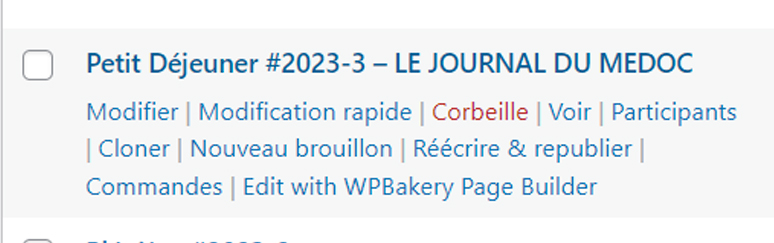
- En survolant l’événement, un menu contextuel apparaît ;
- Cliquez sur « Participants »
[/vc_column_text][/vc_column][/vc_row][vc_row css= ».vc_custom_1674895052079{margin-bottom: 20px !important;border-top-width: 1px !important;border-right-width: 1px !important;border-bottom-width: 1px !important;border-left-width: 1px !important;padding-top: 0px !important;padding-right: 0px !important;padding-bottom: 0px !important;padding-left: 0px !important;border-left-color: #ce1f55 !important;border-left-style: solid !important;border-right-color: #ce1f55 !important;border-right-style: solid !important;border-top-color: #ce1f55 !important;border-top-style: solid !important;border-bottom-color: #ce1f55 !important;border-bottom-style: solid !important;border-radius: 5px !important;} »][vc_column width= »1/6″][vc_column_text]
4
[/vc_column_text][/vc_column][vc_column width= »5/6″][vc_column_text]
L’écran général des « Participants »
[/vc_column_text][vc_column_text]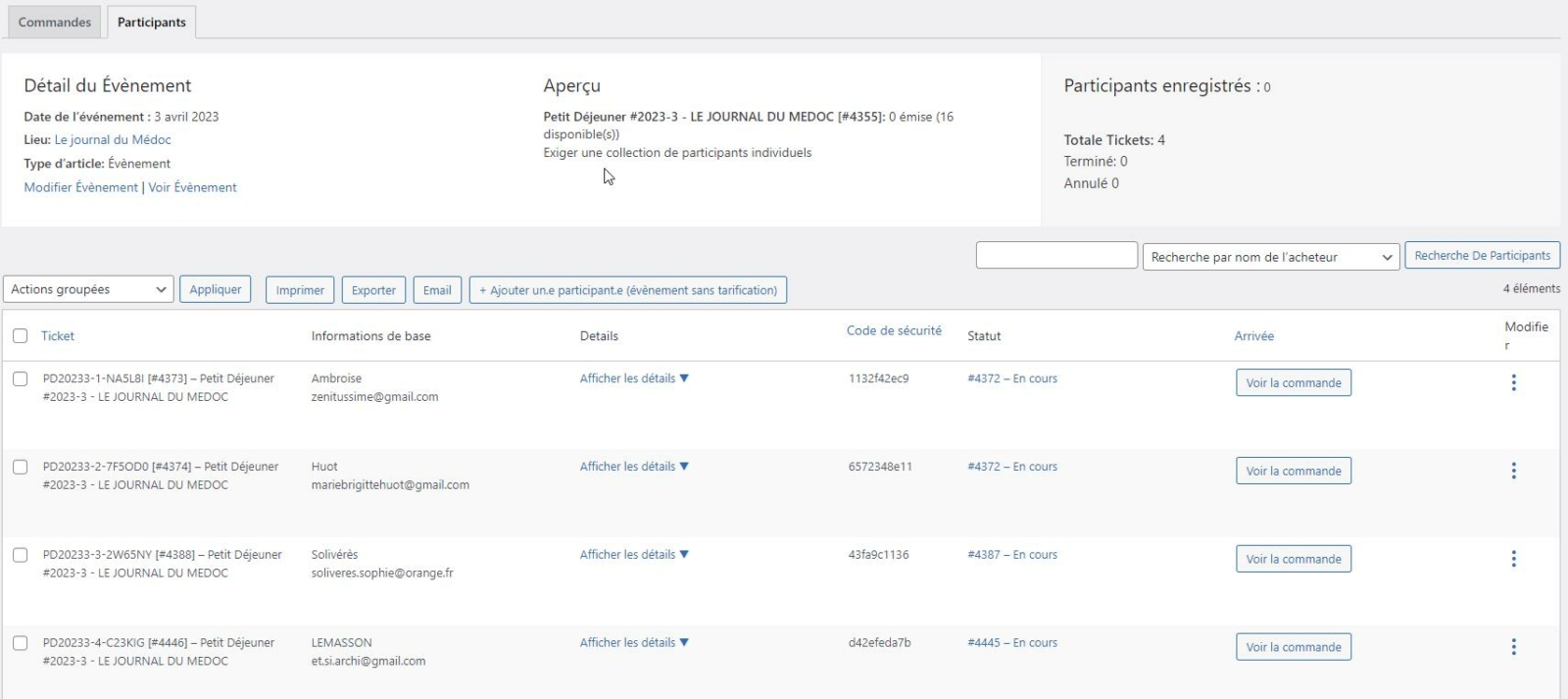 [/vc_column_text][vc_column_text]
Première rangée
= Caractéristiques générales de l’événement + effectifs
- Participants enregistrés : ne pas en tenir compte, valable uniquement si l’on pointe électroniquement les participant à l’entrée.
- Total Tickets : Nombre d’inscrits (y compris les « Annulés)
- Terminé : ne pas tenir compte de ce paramètre.
- Annulé : Inscriptions n’ayant pas abouti
Ligne de commande
- Exporter : permet d’exporter les participants au format CSV (ce format est compatible avec tous les tableurs.
[/vc_column_text][/vc_column][/vc_row]